

















13 Google Retargeting Ad Strategies to Re-Engage Website Visitors
Not every website visitor becomes a customer on their first visit. Some compare options, explore services, or leave before completing a purchase. Retargeting advertising helps businesses reconnect with eligible visitors and encourage them to return.
Retargeting Ads on Google use eligible audience data to show relevant ads to people who have previously interacted with a website, app, or business. With the right audience segments, useful messaging, and careful budget management, businesses can make their advertising more relevant and support conversions.
Here are 13 practical strategies to help you get more from your retargeting campaigns.
What Are Google Retargeting Ads?
Retargeting advertising is a digital marketing approach that helps businesses reconnect with people who have previously interacted with their website, app, or other online touchpoints.
With Retargeting Ads on Google, advertisers can use eligible audience segments to deliver relevant messages to previous visitors and customers. For example, an online store might show relevant product ads to eligible shoppers who viewed products but did not complete a purchase.
Google Ads also uses terms such as your data and data segments in its documentation. Audience eligibility, consent requirements, campaign settings, and advertising policies determine how these features can be used.
13 Google Retargeting Ad Strategies to Try
1. Set a Clear Campaign Goal
Start by deciding what you want your retargeting campaign to achieve. Your goal could be increasing purchases, generating qualified leads, encouraging demo requests, or bringing visitors back to important service pages.
Choose a relevant conversion action and use it to guide your audience selection, messaging, and budget.
2. Set Up and Check Conversion Tracking
Accurate tracking helps you understand whether your ads are contributing to meaningful results. Set up the Google tag and relevant conversion events, then verify that they work correctly.
Track actions such as purchases, form submissions, and qualified inquiries where appropriate. Review your setup regularly, and remember that consent choices, browser restrictions, and platform settings can affect the data available.
3. Create Ads With Relevant Messaging
Your ads should give people a clear reason to return. Instead of using the same message for every visitor, connect your creative to the product, service, or information that interests them.
For example, a software company could highlight a useful feature, while an e-commerce business could showcase a product category. Use clear headlines, relevant visuals, and a direct call to action.
4. Allocate Your Budget Carefully
Not every audience has the same value. Visitors who explored pricing or started checkout may show stronger purchase intent than people who viewed a single blog post.
Review campaign performance and allocate spending according to your goals, audience size, and conversion quality. Avoid increasing the budget simply because an audience generates clicks; check whether those clicks lead to meaningful actions.
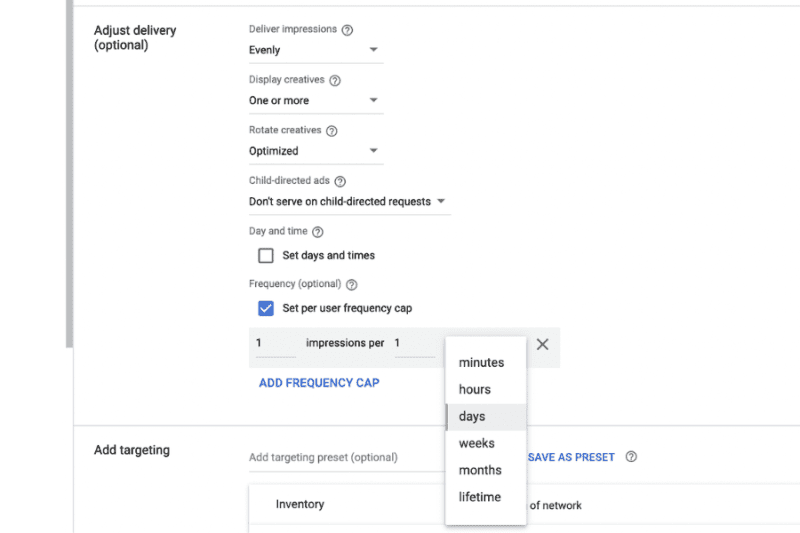
5. Manage Ad Frequency
Showing the same ad too often can frustrate users and waste your budget. Monitor how frequently people see your ads, along with engagement and conversion trends.
Google Ads supports frequency capping in Display and Video campaigns, but not Demand Gen campaigns. Available controls depend on the campaign type, so check Google's official frequency-capping guide before adjusting your settings.
6. Use Sequential Messaging
A visitor may need more than one interaction before making a decision. Sequential messaging lets you present different messages over time rather than repeating the same advertisement.
For example, an initial ad might explain a service's benefits, while a later ad could share a relevant case study. Keep each message useful and avoid assuming that every visitor is ready to buy.
7. Segment Audiences by Behavior
Audience segmentation helps you tailor ads to different stages of the customer journey. You could separate visitors who read educational content from those who explored service pages or started checkout.
Keep your audience segments useful and manageable. Very narrow segments may not have enough eligible users to serve ads. Check the minimum audience requirements for your chosen campaign and network before splitting visitors into smaller groups.
8. Test Your Ads Systematically
A/B testing helps you identify which messages and creative elements perform better. Test one meaningful variable at a time, such as the headline, image, offer, or call to action.
Choose your success metric before testing. Depending on your objective, this could be conversion rate, cost per qualified lead, or purchase value. Give the test enough time and data to produce a useful comparison rather than declaring a winner after a few clicks.

9. Exclude Irrelevant Audiences
Audience exclusions help prevent ads from reaching people who are unlikely to benefit from them. For example, you may exclude existing customers from acquisition campaigns when repeat purchases are not the goal.
You can also exclude converted users from campaigns designed to generate the same conversion again, where the campaign supports it. Review exclusions regularly so they continue to match your business objectives.
10. Reach Eligible Cart Abandoners
Some e-commerce visitors add products to their carts but leave without completing their purchases. Retargeting can remind eligible shoppers about the products they viewed and encourage them to return.
Use product-specific messaging where supported, and make the next step clear. Check your audience setup, consent requirements, and campaign eligibility before launching cart-abandonment ads.
11. Coordinate Retargeting With Email Marketing
Retargeting ads and email marketing can support each other throughout the customer journey. For example, an email might share product details, while an ad reinforces a relevant benefit.
Keep both channels consistent, but avoid overwhelming people with repeated messages. Use each channel where it adds value, and respect users' communication preferences and applicable privacy requirements.
12. Use Discounts Selectively
A discount may encourage some visitors to complete a purchase, but it should not be the default message for every audience.
Consider whether an offer is necessary and whether it supports your profit goals. For service-based businesses, a consultation, demo, or helpful resource may be more suitable than a price reduction.
13. Build Trust With Social Proof
People often want reassurance before choosing a product or service. Relevant customer reviews, testimonials, case studies, and product ratings can help address common concerns.
Use genuine, accurate claims and follow the applicable advertising policies. Choose proof that matches the audience's needs rather than adding testimonials simply to make an ad look more persuasive.
A Practical Way to Match Ads to Visitor Intent
A useful retargeting strategy connects visitor behavior with the next relevant message. This simple framework can help you plan your campaigns.
| Visitor behavior | Possible next message |
| Reads an educational blog | Share a related resource. |
| Visits a service page | Explain the service's value and benefits. |
| Reviews pricing | Invite them to discuss their requirements. |
| Reads a case study | Share a related project or explain your approach. |
| Submits an inquiry | Stop showing ads designed to generate that same inquiry, where supported. |
These are starting points, not fixed rules. Use available data and campaign results to refine your approach.
Common Challenges With Google Retargeting Ads
Retargeting can be useful, but a few challenges require attention:
- Privacy and consent: Follow applicable privacy laws and Google's policies when collecting and using audience data.
- Limited audience reach: Not every visitor will be eligible for retargeting. Check campaign and network requirements before building small segments.
- Ad fatigue: Repeated exposure to similar ads can reduce engagement. Refresh creative and review frequency.
- Tracking limitations: Browser restrictions, consent choices, and measurement settings can affect reporting. Check your implementation before drawing conclusions.
- Uncertain performance: Retargeting does not guarantee conversions. Evaluate results against your goals and overall marketing performance.
How to Measure Retargeting Performance
Use metrics that reflect your campaign objective rather than judging success by clicks alone.
| Metric | What it helps you understand |
| Click-through rate (CTR) | How often people click after seeing an ad. |
| Conversion rate | How often ad interactions lead to a desired action. |
| Cost per conversion | How much you spend for each recorded conversion. |
| Return on ad spend (ROAS) | The advertising revenue generated for each dollar spent, when revenue tracking is available. |
| Lead quality | Whether generated leads are relevant to your business. |
Review these metrics together. A campaign with fewer conversions may still be valuable if it generates higher-quality leads or more profitable sales.
Final Thoughts
Google retargeting ads can help businesses reconnect with eligible visitors, deliver more relevant messages, and support conversions. The key is to understand visitor intent, create useful ads, manage frequency, and measure outcomes carefully.
If you want to improve your paid advertising strategy, explore Justo Consulting's Google and YouTube Ads management and digital advertising services. You can also contact our team to discuss your goals.