




The Ultimate Web Development Roadmap: A Complete Step-by-Step Guide for 2026
The internet is changing fast. We see new things coming out all the time, like apps that use intelligence. Also People want to be able to use websites and apps. So the job of a web developer is very important now especially when following a web development roadmap. For people who are just starting out it can be a lot to take in. There are many new technologies and programming languages to learn.
For the beginner's, it’s helpful to first understand the basics through a detailed Web development introduction: The ultimate comprehensive guide for beginners, especially for website development for beginners, before following a full-stack roadmap. You can also explore our home page to discover more helpful guides and resources on web development.
The web developer has to know about all these things to do their job well. Web developers have a role to play in making sure websites work properly and are easy to use, which is a core part of responsive web development.
These same skills are also the foundation of Business Website Development, where responsive design, usability, and reliable functionality come together to create effective digital experiences.
So you want to learn about becoming a full-stack developer. This is a guide that will help you go from knowing nothing to being ready for a job as a full-stack developer. We will look at the technologies you need to know and the steps you need to take to get there as part of a web development roadmap. We will also answer some of the questions people have about what is next, for full-stack developers and full stack web development careers.
What is the Roadmap for Web Development?
A web development roadmap is like a plan that shows you what skills and technologies you need to learn to make websites and web applications. This plan helps you learn things one step at a time. It makes sure you do not try to learn things like React before you know the basics of JavaScript. The roadmap is really important because it guides you and helps you learn web development in the order. You can think of a roadmap, as a map that shows you where to start and what to learn next to become good at web development and eventually a full stack developer
The roadmap is usually broken down into three areas of study:
Frontend Development is what the user sees and interacts with on a website.
Backend Development is what happens behind the scenes of a website, including python backend development and other server-side technologies.
Full-Stack Development is when you do both. This means a developer can make an application from the start and work in full stack web development environments.
The Foundational Trio
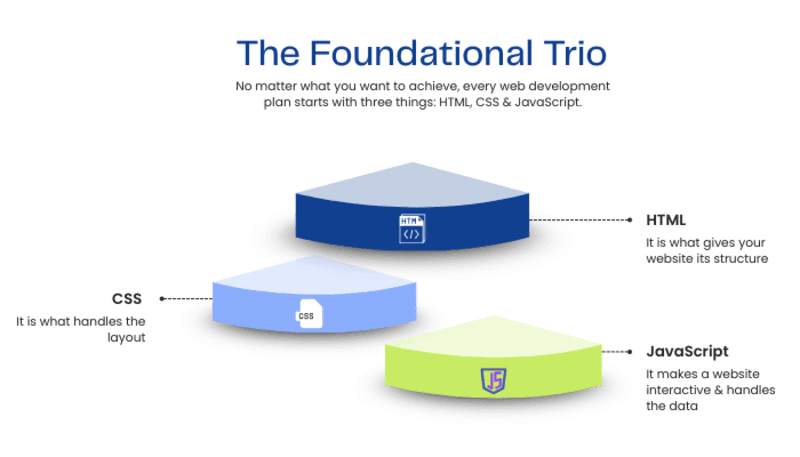
No matter what you want to achieve, every web development plan starts with three things: HTML, CSS & JavaScript.
HTML is the framework of the web. It is what gives your website its structure. HTML is, like the bones of your website, it holds everything together.
CSS, which is short for Cascading Style Sheets, is like the skin and clothes of a website.
It is what handles the layout. CSS also handles colors and fonts and things like that, especially for responsive web development.
JavaScript is like the brain of a website. It makes a website interactive & handles the data. JavaScript is really important for making a website work the way it should.
What are the 7 Stages of Web Development?
The web development roadmap is really long. It is better to break it down into seven smaller parts. When you follow these parts you will learn things in a way, where each new thing you learn is based on the web development things you already know from before, about the web development roadmap.
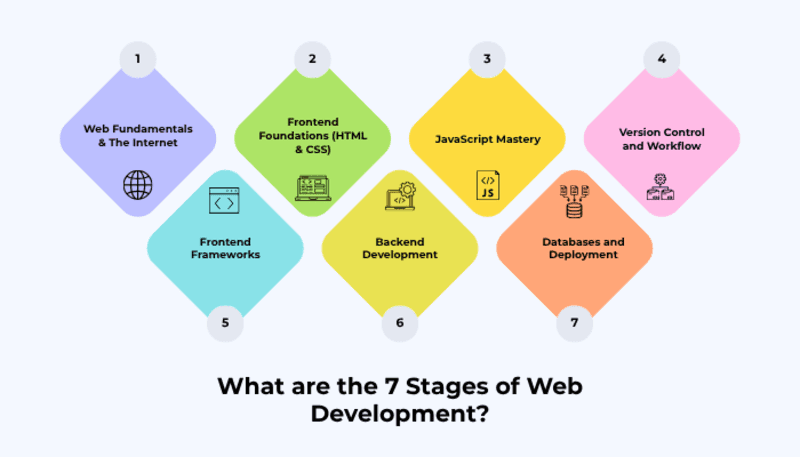
Stage 1: Web Fundamentals & The Internet
You have to know how the web works before you start writing any code. The web is what makes it possible for people to access websites and online information. Understanding the web is really important for writing code. You need to know how the web works to make sure your code does what you want it to do, especially in website development for beginners. And also it is very important to understand when you are writing code.
- How Browsers Work: Understanding the request-response cycle.
- HTTP/HTTPS: The protocols for transferring data.
- Hosting: This is how a website gets its name and a place to live on a server.
- DNS: The phonebook of the internet.
Stage 2: Frontend Foundations (HTML & CSS)
This is the place where you make your static pages. You are going to create your static pages here.
- HTML5: Semantic tags, forms, and accessibility (A11y).
- CSS3: The Box Model, Flexbox, and CSS Grid.
- Responsive Design: For Responsive design Media Queries are a must which make sites look good on desktop and mobile, a key part of responsive web development.
- CSS Frameworks: Introduction to tools like Tailwind CSS or Bootstrap.
- Along with all these strong fundamentals you need to understand the modern perspective of UI/UX, peoples expectations and web design trends that win clients in 2025. it will help you to develop the interfaces which actually win trust of your client and audience's engagement.
Stage 3: JavaScript Mastery
JavaScript is the most important language in the web development roadmap and in full stack web development.
- Basic Syntax: Variables, loops, and data types.
- DOM Manipulation: Changing the HTML/CSS of a page using JS.
- Asynchronous JS: Fetching data from APIs using Async/Await and Promises.
- ES6+ Features: Arrow functions, destructuring, and modules.
Stage 4: Version Control and Workflow
Developers who are really good at what they do is not just writing code, they also manage the code that they write. Managing code is a part of being a professional developer, especially for a full stack developer.
Choosing the right editors, frameworks, deployment platforms, and collaboration tools plays a major role here, which is covered in detail in the complete 2026 guide: Choosing the best web development software and tools.
- Git: Tracking changes in your project.
- GitHub/GitLab: Collaborating with others and hosting your code.
- Terminal/CLI: Learning to navigate your computer via the command line.
Stage 5: Frontend Frameworks
When you get really good at using "Vanilla" JavaScript you can start using frameworks that make it easier to build user interfaces.
- React.js: Currently the industry standard.
- State Management: Learning Redux or React Context API.
- Routing: Navigating between pages in a Single Page Application (SPA).
Stage 6: Backend Development
To become a Full-Stack developer you need to work with data, including tools used in python backend development and Node.js environments.
- Runtime Environment: Node.js.
- Server Frameworks: Express.js.
- API’s: Building RESTful services that the frontend can talk to.
- Authentication: Implementing Login/Signup using JWT or OAuth.
Backend development is a major part of Custom Software Solutions because it allows businesses to build secure applications, manage data, connect APIs, and create functionality based on their specific operational needs.
Stage 7: Databases and Deployment
The last step is to make your application live.
- Databases: Relational (PostgreSQL/MySQL) vs. Non-Relational (MongoDB).
- Cloud Hosting: Vercel, Netlify, or AWS.
- CI/CD: Automating the deployment process.
Can I Master Full Stack in 3 Months?
The short answer is: No.
So many coding bootcamps say you can be a master in twelve weeks.. The truth about learning web development is not that simple. If you study for three months you can get good at the basics of web development and You can learn how to make a web application that works, like a CRUD application that lets you Create, Read, Update and Delete things.
To really get good at something you need to have a deep understanding of the thing itself like mastery of the subject and that means you have to know the subject really well so mastery is all, about knowing the details and stuff.
- Scalable software architecture.
- Advanced performance optimization.
- Security best practices.
- Debugging complex, production-level bugs.
If you are just starting out it will probably take you around 8 to 12 months of practice to get good enough to get a job. Some people think they can do it in 3 months. This is not a good idea. Learning to code in 3 months can be really stressful and you might end up with big gaps in your knowledge. For example you might be able to copy and paste code. You will not really understand how it works or what the code is doing. This is not a way to learn coding because coding is not just about copying code, coding is about understanding the logic behind the code. A beginner should focus on learning coding and this takes time around 8 to 12 months of consistent practice to become job-ready in full stack web development.
What you can do in three months:
- Month 1: HTML, CSS, and basic Responsive Design for responsive web development.
- Month 2: JavaScript Fundamentals and DOM projects.
- Month 3: Introduction to React and building a basic Frontend portfolio.
Is Python or HTML Harder?
When you think about Python and HTML it is really like thinking about two different things. Python is like a set of instructions that tell you how to build something. HTML is like a tool that helps you make something look nice. They do different jobs.
HTML (The Markup Language)
- Difficulty: Very Easy.
- Nature: HTML is not something you use to write programs. It is actually a way to mark up things. You do not have things like if something happens then do this or do something over and over again in HTML.
- Learning Curve: You can learn the basics of HTML in a weekend. This is because HTML is really about putting tags on your content. These tags tell the browser what things are, like what's a header, what is a paragraph or what is an image.
Python (The Programming Language)
- Difficulty: Easy (relative to other programming languages), but harder than HTML.
- Nature - is a language that people use to tell computers what to do. It is a high-level language that's easy to understand. It involves thinking using mathematics, working with data structures and figuring out algorithms.
- Learning Curve: Python is easy to understand because it looks like English.. To really get good at using Python for making websites, especially in python backend development, it takes a lot of time. which means using things like Django or Flask takes a lot of time, usually several months.
- The Verdict: Python is harder because it makes you think like a programmer. You have to understand how to write code. On the other hand people say Python is a great language to start with because it is easy to read.
If you want to make websites you will probably start with HTML. This is because HTML lets you see what you are doing which is really helpful when you are just starting out. It keeps you motivated to keep learning.
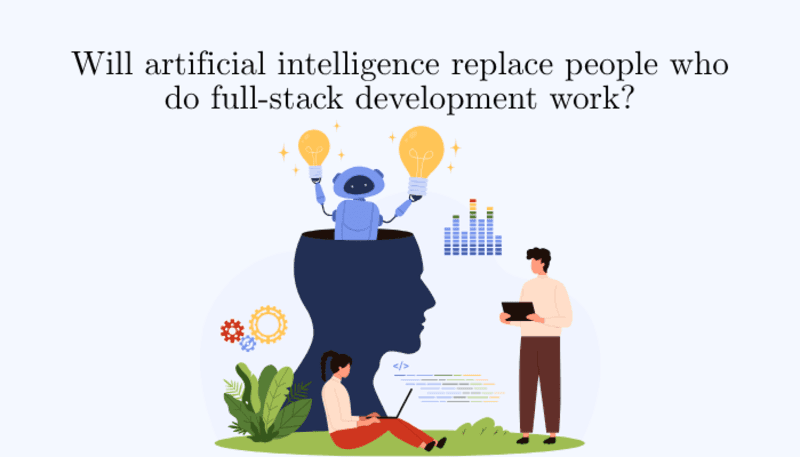
Will artificial intelligence replace people who do full-stack development work?
This is a question that a lot of full-stack developers are worried about. They want to know if artificial intelligence is going to take their jobs. There are tools like ChatGPT, Claude and GitHub Copilot that can make code snippets quickly and this is making a lot of people worried about the future of the developer. The developer is an important person and people are wondering if the developer will still be needed with tools, like ChatGPT, Claude and GitHub Copilot around.
The Reality: AI as a Co-Pilot, Not a Pilot
- AI is exceptionally good at:
- Writing boilerplate code (repetitive setup code).
- Refactoring small functions.
- Explaining errors and suggesting fixes.
- Writing unit tests.
However, AI cannot currently:
To really get what a company is about, you have to understand the business logic. The thing is, artificial intelligence does not know why a company needs a feature. It just knows how to write the code for that feature.
When we talk about Architect Systems we need to think about how all the different parts of a big system work together. This is a system so it is huge. For it to be really secure and work well we need people to make decisions. Architect Systems are about figuring out how these parts should interact with each other. This is not something a computer can do on its own. We need judgment to make sure Architect Systems are the best they can be.
People think that artificial intelligence is really smart.. The thing is, artificial intelligence works with the information it already has. It does not really come up with things on its own. The ability to truly innovate and solve problems in a way is something that people are good at, not artificial intelligence.
To make something that people will really like we need to understand how they feel. Designing a user experience is all about getting it to feel just right. This means we have to be able to put ourselves in the user's shoes and think about what they want. We need to have a sense of human emotions to do this. Making a user experience that feels right is a part of designing something that users will love. We have to think about the users and how they will feel when they use what we design.
The Shift in the Web Development Roadmap
In the future the web development roadmap will probably have something called AI Literacy. This means that by taking a long time to write a basic CSS layout developers can use Artificial Intelligence to make the layout really fast, like, in 5 seconds. Then they can use the rest of the time which's 4 hours and 55 minutes to work on bigger problems, make sure everything is secure and get all the parts to work together.
Artificial Intelligence will not take the place of developers. Developers who use Artificial Intelligence will take the place of developers who do not use Artificial Intelligence.
Essential Projects for Your Portfolio
Learning something is not enough. You actually have to use what you know to make it worth anything. To show that you have really learned web development you need to have a portfolio, especially for website development for beginners transitioning into professional roles. Here are some project ideas, for each level of web development:
- Beginner Projects (Focus: HTML/CSS/JS)
- Personal Portfolio: A responsive site showcasing your bio and contact info.
- Interactive Quiz: This is a quiz that you can do on your computer. The Interactive Quiz uses JavaScript to work. The main thing the Interactive Quiz does is track your scores when you answer the questions.
- Weather App: It is really cool because it uses an API to show you what the weather is like right now. This means you can see the real-time weather data, for any place you want to check.
Intermediate Projects (Focus: Frameworks & State)
- E-commerce Product Page: Including a functional shopping cart using React.
- Movie Database: This is a site that gets information from The Movie Database and it lets people look for movies by using filters or searching for them.
- Task Management Dashboard: A "Trello" clone with drag-and-drop features.
Advanced Projects (Focus: Full-Stack & Databases)
- The Social Media Platform is where people can make an account. Then they can post things and also like the things that other people post on the Social Media Platform.
- Real-time Chat App: Using WebSockets (Socket.io) for instant messaging.
- SaaS Dashboard: A subscription-based tool with payment integration (Stripe).
The web development roadmap is not something you can rush through, it is something that takes time. The things you learn about web development like HTML and CSS and JavaScript are the parts of the digital world. Even though the tools we use might be different someday. Artificial intelligence might help us. The main thing that a web developer needs to be good at is still the same: solving problems, with web development, HTML, CSS and JavaScript.
If you have questions or need personalized guidance, feel free to reach out through our contact us page
Whether the goal is building a Business Website, a Custom Ecommerce platform, or a larger Custom Software Solution, these core development skills remain essential for creating reliable and scalable digital products.
To succeed in 2026 and beyond:
- Stay Consistent: Code for at least one hour every day.
- Build Projects: You should not just watch videos, you need to work on the projects and get your hands dirty with the Build Projects. This will help you learn more about the Build Projects.
By following this structured path, you aren't just learning to code; you are building a career in full stack web development and becoming a skilled full stack developer and rewarding industries in the world. Start with Stage 1 today, and in a year, you’ll be amazed at how far you’ve come.